

Why You Must Protect the Domains You Aren’t Using: A Critical Step in Preventing Phishing
We recently wrote an article for those who manage their own Internet domain names about using SPF, DKIM, and DMARC to prevent your active domains from being used in phishing attacks and to improve the deliverability of legitimate email. These protections are essential for any domain you use to send or receive messages.
But what about the other domains you own, the ones that sit unused, parked, or reserved for future projects? Many organizations forget about them entirely. Attackers count on that.
Why Unused Domains Matter
Spammers often look for domains that appear legitimate but are not protected, because that makes phishing attacks far more convincing. If a company owns several variations of its primary domain, attackers may choose one of the unused ones, forge email from it, and rely on the fact that no authentication policies are in place to block the messages.
To a recipient, these forged messages can look completely valid, especially when the unused domain still resembles the company’s real branding.
How SPF, DKIM, and DMARC Protect You
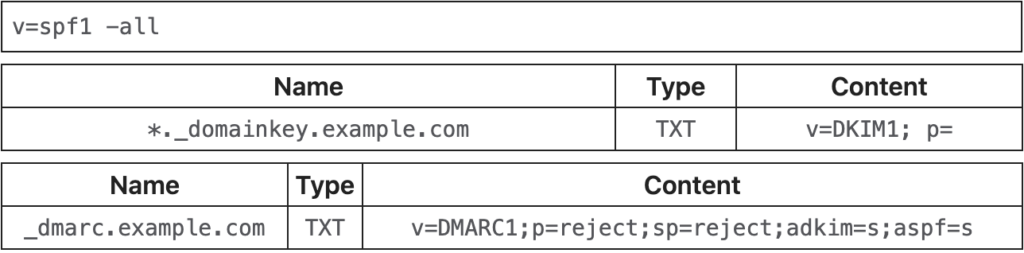
Just as these technologies protect your primary domain, they can also be configured to protect domains that should never send email at all. By creating strict DNS policies that say “no email is allowed from this domain,” you effectively shut down any attempt to spoof it.
With the right configuration:
-
SPF can be set to indicate that no mail servers are authorized.
-
DKIM can be configured to ensure no valid signatures exist.
-
DMARC can reject any message claiming to come from the domain, which prevents forged email from reaching inboxes.
This simple step prevents your unused domains from being weaponized in phishing campaigns.
A Trusted Reference & Free Email Health Check
The technical setup varies depending on your DNS provider, but Cloudflare has an excellent guide that walks through exactly what you need to do. If you manage your own DNS, their article is a great place to start.
If you prefer to have a professional handle it, Monge IT can audit your domains and configure SPF, DKIM, and DMARC so that every domain you own, whether used or unused, is fully protected. We provide a free email health check here that will give you more insight into the state of your account!