
Choosing the Right Charger for Your MacBook: Why Wattage Matters More Than You Think
If you lose or break the power adapter that came with your MacBook Air or MacBook Pro, it can be tempting to grab the first USB-C charger you find on Amazon or borrow whatever is nearby. But not all chargers are created equal, and using one that does not meet the wattage requirements of your Mac can lead to frustrating performance issues and even long-term battery problems.
Using a charger with too low a wattage can result in:
• Extremely slow charging
• No charging at all
• The battery draining even while plugged in
• Your Mac running hotter as it struggles to draw enough power
• Inability to use fast charging
That makes it essential to choose a charger that meets or exceeds the wattage Apple recommends for your specific model.
(Featured image by iStock.com/Isaac Lee)
How to Check Your Current Charger’s Wattage
If you want to confirm what you are using now, you have two easy options:
1. Look at the Charger Itself
Apple power adapters list their wattage in very small print on the side or bottom. You will see something like “30W,” “67W,” or “140W.” This number tells you the maximum power output of the charger.
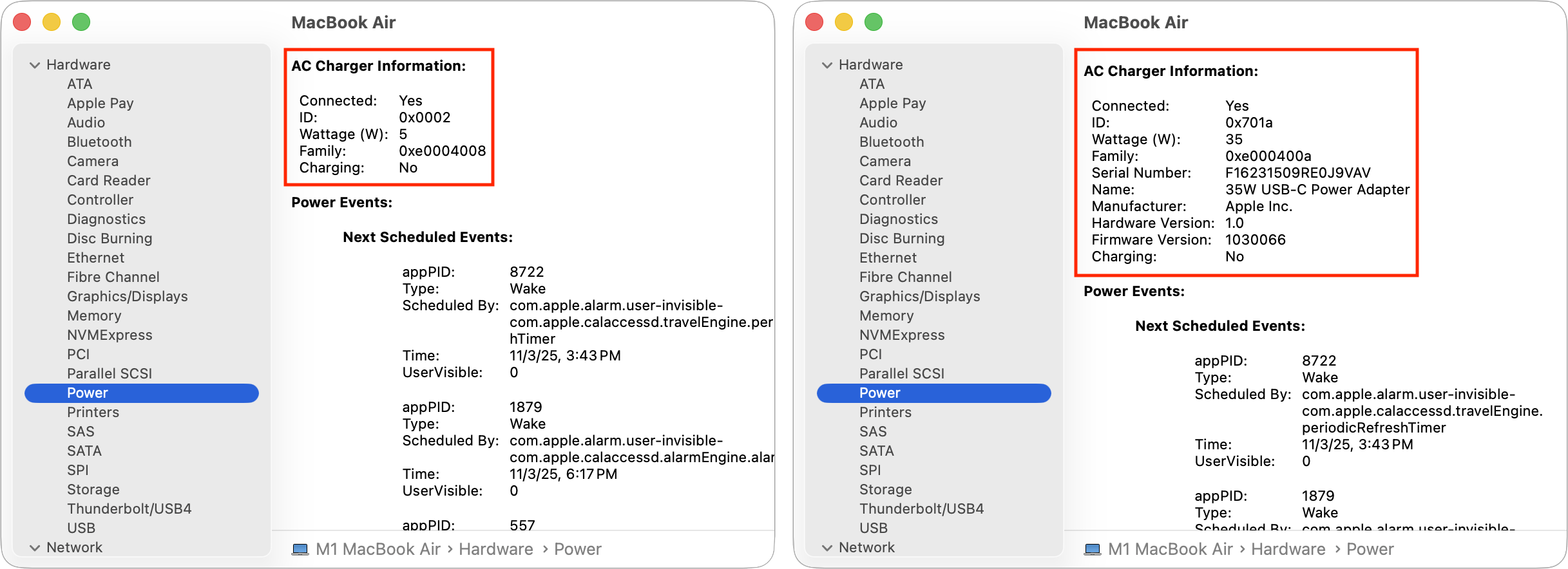
2. Check System Information on Your Mac
Your Mac can also tell you what wattage it is receiving:
-
Open Applications > Utilities > System Information
-
In the left sidebar, click Power
-
Look for the AC Charger Information section
This displays the wattage and amperage of the charger currently connected. If you see your Mac drawing a lower wattage than expected, the charger may be insufficient.
Using Higher vs. Lower Wattage Chargers
A common question we hear is, “Can I use a higher-wattage charger than the one that came with my Mac?”
Good news: Yes.
It is completely safe to use a higher-wattage Apple-compatible USB-C charger. Your Mac will draw only the amount of power it needs. Higher wattage is especially useful if you want fast charging or if you run heavy tasks like video editing, development tools, or multiple external displays.
What you should not do is use a lower-wattage charger. That can cause significant charging delays or prevent charging entirely, especially if you are actively using the Mac.
Recommended Wattages for Each MacBook Model
Apple designs each MacBook with a charger that matches its energy needs. Here are the baseline requirements:
MacBook Air
13-inch MacBook Air
• 30W or 35W standard
• 67W for fast charging
15-inch MacBook Air
• 35W standard
• 70W for fast charging
MacBook Pro
14-inch MacBook Pro
• 67W or 70W standard (varies by chip)
• 96W recommended for Pro and Max chips
• 96W for fast charging
16-inch MacBook Pro
• 140W required for both standard and fast charging
Using the correct wattage ensures your Mac performs at its best and charges at the speed Apple intended.
Beware of Cheap Third-Party Chargers
While many third-party chargers are safe, extremely low-cost adapters can put your Mac at risk. Poor-quality chargers may:
• Deliver unstable power
• Fail to meet their advertised wattage
• Overheat
• Damage the battery or USB-C port
• Create electrical hazards
If you choose a third-party charger, look for brands that support USB-C Power Delivery (USB-C PD) and have strong safety certifications. When in doubt, stick with Apple or a reputable accessory maker.
Why Choosing the Right Charger Is Worth It
Your Mac’s charger is more than a convenience. It is part of the system that maintains battery health, supports peak performance, and ensures you can work throughout the day without interruptions.
Choosing the right wattage:
• Speeds up charging
• Prevents power-related slowdowns
• Extends long-term battery lifespan
• Keeps your Mac running efficiently during demanding tasks
A small difference in wattage can mean a big difference in usability. For businesses that rely on Apple devices, Monge IT delivers trusted Mac support, troubleshooting, and guidance to keep your team running smoothly. Learn more about our Apple IT business plans here!