
How to Find and Silence the Browser Tab That’s Playing Audio
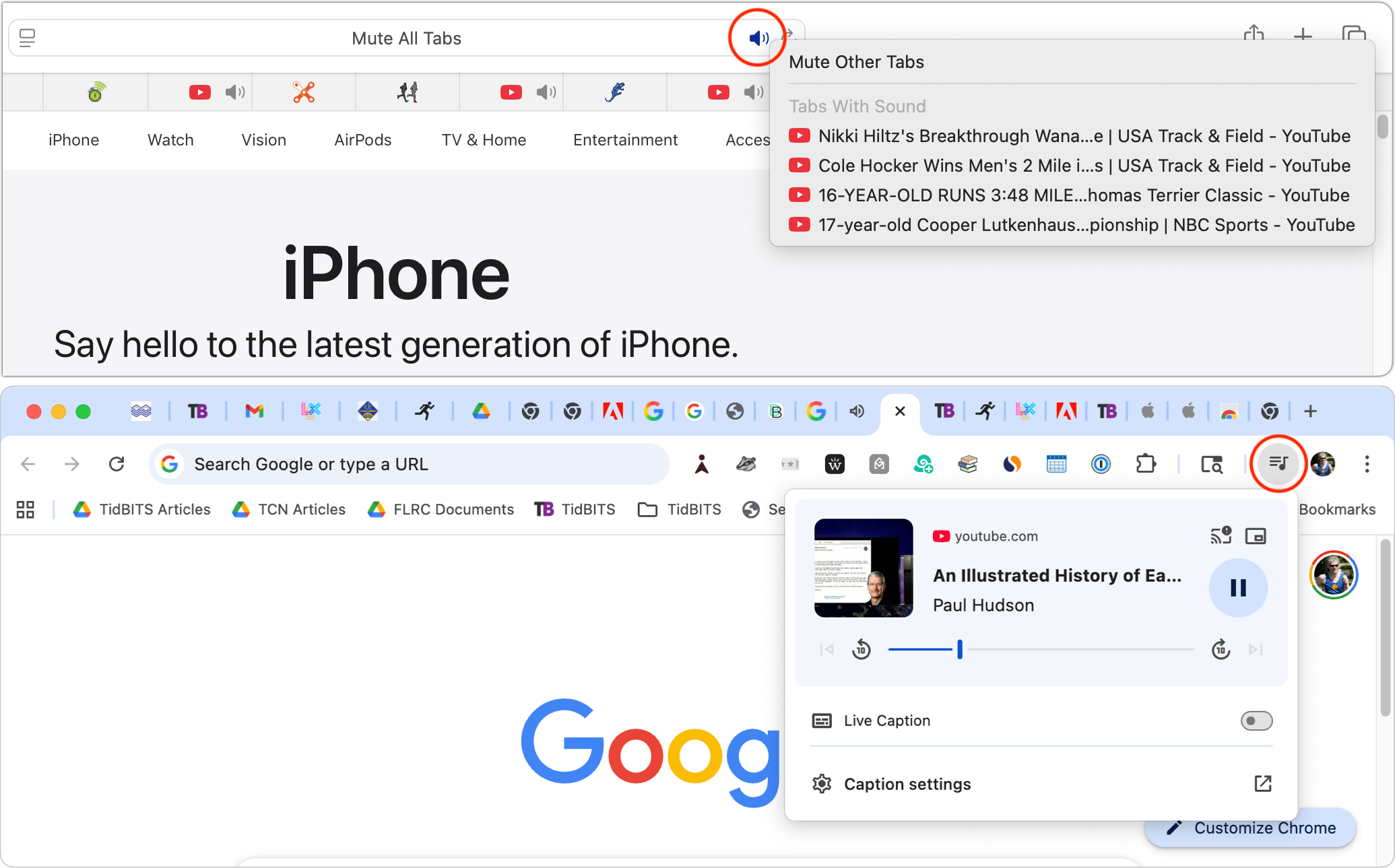
When a Web browser has many tabs open, it can be hard to find the one playing sound if you need to silence it. Worse, when a browser relaunches, it can be tough to identify and silence all the tabs that have automatically started playing audio. Fortunately, many browsers have tools available to help. Tabs with active audio show a speaker icon next to their names; click it to mute the audio.
Safari provides an additional option: a speaker icon on the right side of the address bar (top screenshot). Click it to mute all audio, or Control-click it to see which tabs are playing audio. Chromium-based browsers—including Google Chrome, Brave, and Microsoft Edge—display a musical note icon in the upper-right corner of the toolbar (bottom screenshot). Click it to open playback controls and stop playback.
These speaker icons are even easier to spot in browsers that display tabs vertically rather than across the top, where too many tabs may prevent the speaker icons from showing.
(Featured image based on an original by iStock.com/Khosrork)
====