
Skip to content
Monge IT Consulting, Inc.
  • About
  • Plans
  • Quote
  • Tips
  • News
  • Testimonials
  • Contact
Monge IT Consulting, Inc.
  • When to Trust AI Tech Answers (And When to Call Us)

    When to Trust AI Tech Answers (And When to Call Us)

    Recently, we’ve fielded a spate of questions from people who have used an AI chatbot to help with a technical issue and then asked us to confirm whether the information was accurate, helpful, or even safe. First off, we’re not offended. If you can work through simple problems on your own with the help of…


    Read More When to Trust AI Tech Answers (And When to Call Us)Continue

  • Backups: Trust but Verify

    Backups: Trust but Verify

    It’s easy to assume your backup app—whether it’s Time Machine, Carbon Copy Cloner, Backblaze, Retrospect, or something else—is quietly doing its job. But it’s possible for a bug to corrupt backups or for a destination disk to fail silently, such that you can’t restore backed-up data. We’ve seen this happen! For peace of mind, set…

    Read More Backups: Trust but VerifyContinue

  • Protect Unused Domains: Why You Must Secure the Domains You Aren’t Using to Prevent Phishing

    Why You Must Protect the Domains You Aren’t Using: A Critical Step in Preventing Phishing

    We recently wrote an article for those who manage their own Internet domain names about using SPF, DKIM, and DMARC to prevent your active domains from being used in phishing attacks and to improve the deliverability of legitimate email. These protections are essential for any domain you use to send or receive messages. But what…

    Read More Why You Must Protect the Domains You Aren’t Using: A Critical Step in Preventing PhishingContinue

  • Watch What You Say in AI-Recorded Meetings

    Watch What You Say in AI-Recorded Meetings

    You’re in a meeting with colleagues, and after everyone else has trickled out, you talk about a sensitive topic with a trusted friend. That would typically be no problem with an in-person meeting, but with a modern virtual meeting, where an AI records a transcript, summarizes what was said, and automatically emails it to all…

    Read More Watch What You Say in AI-Recorded MeetingsContinue

  • What Is Safe Mode, and When Should You Use It?

    What Is Safe Mode, and When Should You Use It?

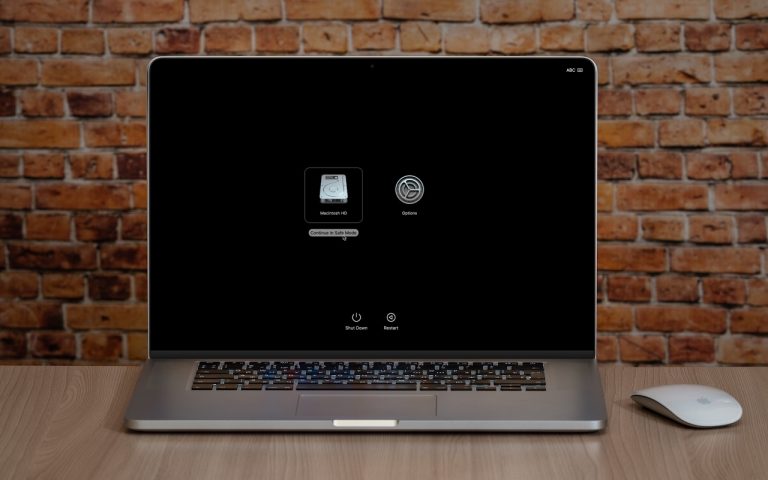
    Although Macs are highly reliable, unusual problems can still rear their ugly heads. Often, these issues are caused by software you’ve installed or accessories you’ve connected. If you’re experiencing Mac misbehavior that isn’t easily fixed by restarting, updating software, or unplugging a dodgy device, try safe mode. (Seriously, before checking if safe mode will help with a problem, you should always restart, ensure you’re running the latest version of macOS and any involved apps, and unplug non-essential peripherals.)

    Read More What Is Safe Mode, and When Should You Use It?Continue

  • Monge IT Windows to Mac Migration

    Windows to Mac Migration: A Case Study in Seamless Transition

    This white paper delves into the successful migration of BWM Global, a prominent supplier of premium promotional products and services to professional sports teams and corporate America, from a Windows-based IT infrastructure to a Mac centric environment. BWM Global encountered challenges due to slow hardware, outdated operating systems, and platform inconsistencies. The migration to a…

    Read More Windows to Mac Migration: A Case Study in Seamless TransitionContinue

  • Recovering from a Failed Update with a Nearby iPhone or iPad

    Restore Nearby iPhone: Recover a Stuck Update on iPhone 16 or A17 Pro iPad mini

    If your iPhone 16 or A17 Pro iPad mini gets stuck during an update, Apple’s new recovery feature lets you use a nearby iPhone or iPad to get back up and running. We hope you never need this new recovery option that Apple has added to the iPhone 16 and current iPad mini (with an…

    Read More Restore Nearby iPhone: Recover a Stuck Update on iPhone 16 or A17 Pro iPad miniContinue

  • Mac Terminal Malware Scam Monge IT

    Mac Terminal Malware Scam: Watch for This Copy‑Paste Attack

    Mac Terminal Malware Scam: Don’t Paste Unsolicited Commands. Here’s a new scam to watch for. A client reported running across a suspicious website masquerading as a human verification test.

    Read More Mac Terminal Malware Scam: Watch for This Copy‑Paste AttackContinue

  • Architecture copies

    Migrating to Google Workspace: Part 3 – Backups

    Our client needed a backup solution for cloud-based data stored in Google Workspace to address the short retention period of deleted data.  We chose an awesome cloud based service for its cost-effectiveness, ease of setup, and automation capabilities. Our plan includes multiple backup sources, enhanced data restore options, and indefinite data retention, providing a robust backup strategy for data stored in the cloud.

    Read More Migrating to Google Workspace: Part 3 – BackupsContinue

  • Building communications wires

    Migrating to Google Workspace: Part 2 – Communications

    Read how we successfully migrated our client’s email service from hosted Microsoft Exchange to Google Workspace. The migration process involved careful planning, user training, and the use of specialized migration tools.  The transition resulted in cost savings, improved collaboration tools, and enhanced security features for the company.

    Read More Migrating to Google Workspace: Part 2 – CommunicationsContinue

Page navigation

1 2 Next PageNext

Monge IT Consulting Logo Color

© 2026 Monge IT Consulting, Inc.

Facebook Linkedin YouTube

Proud supporting partner of Matthias Community!

  • About
  • Plans
  • Quote
  • Tips
  • News
  • Testimonials
  • Contact
Search